TABLE OF CONTENTS
Introduction
Contacts must be linked to pupils and have a Relationship assigned to their record.
Add a contact to a pupil
- Go to Pupils > [Relevant Pupil stage].
- Find the required pupil in the grid.
- Go to the Contacts tab on the pupil record.
Select Add Contact to Pupil.

The Contact Information window opens listing all the contacts in the database.
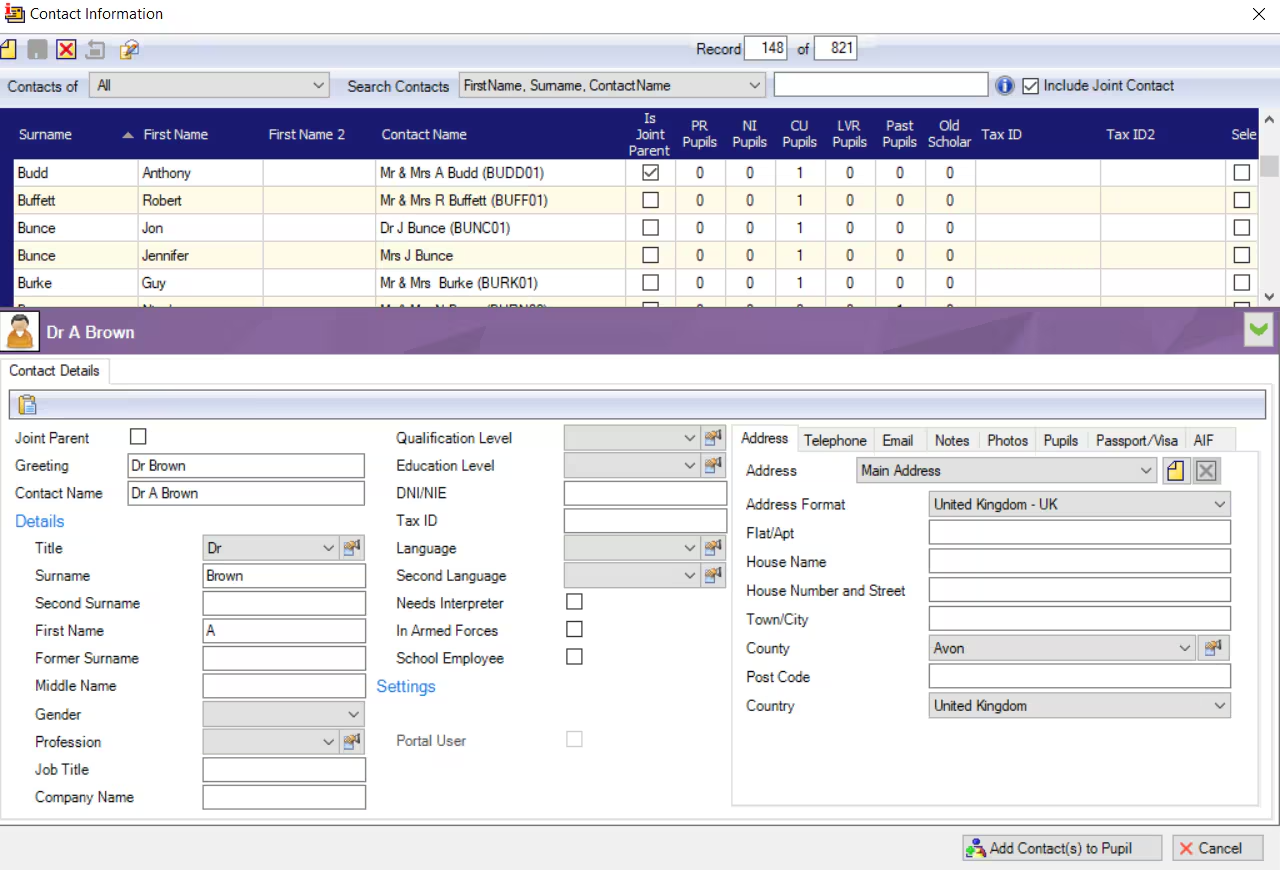
- Search for the contact name in the Search Contacts field.
- Once found tick the contact to select them.
- Select Add Contact(s) to Pupil.
- The window closes and the contact is added to the pupil record.
In the Contacts tab select the Relationship of the contact to the pupil.

- Select Save.
- Repeat the process for any siblings.
Find out how to add a contact to the database here: Add a contact or see the Adding Contacts to Pupils guide for more information.
Was this article helpful?
That’s Great!
Thank you for your feedback
Sorry! We couldn't be helpful
Thank you for your feedback
Feedback sent
We appreciate your effort and will try to fix the article