TABLE OF CONTENTS
Introduction
A pupil can be added to the prospective, new intake or current stage. It is recommended that they are added to prospective so that all the required information is captured. There are 2 ways to add pupils; Add New and Add Pupil. It is recommended that you use Add Pupil.
Add a pupil
Using the Add New button.
- Go to Pupils > Prospective.
Select the Add New button.

A new row appears in the grid. Complete the available fields and select Save.

You will only be able to complete the fields that you have visible in the grid. Once saved you can add more detail to the pupil record.
Using the Add Pupil button
- Go to Pupils > Prospective.
Select the Add Pupil button.

A window will open. Complete the relevant fields then select Save.
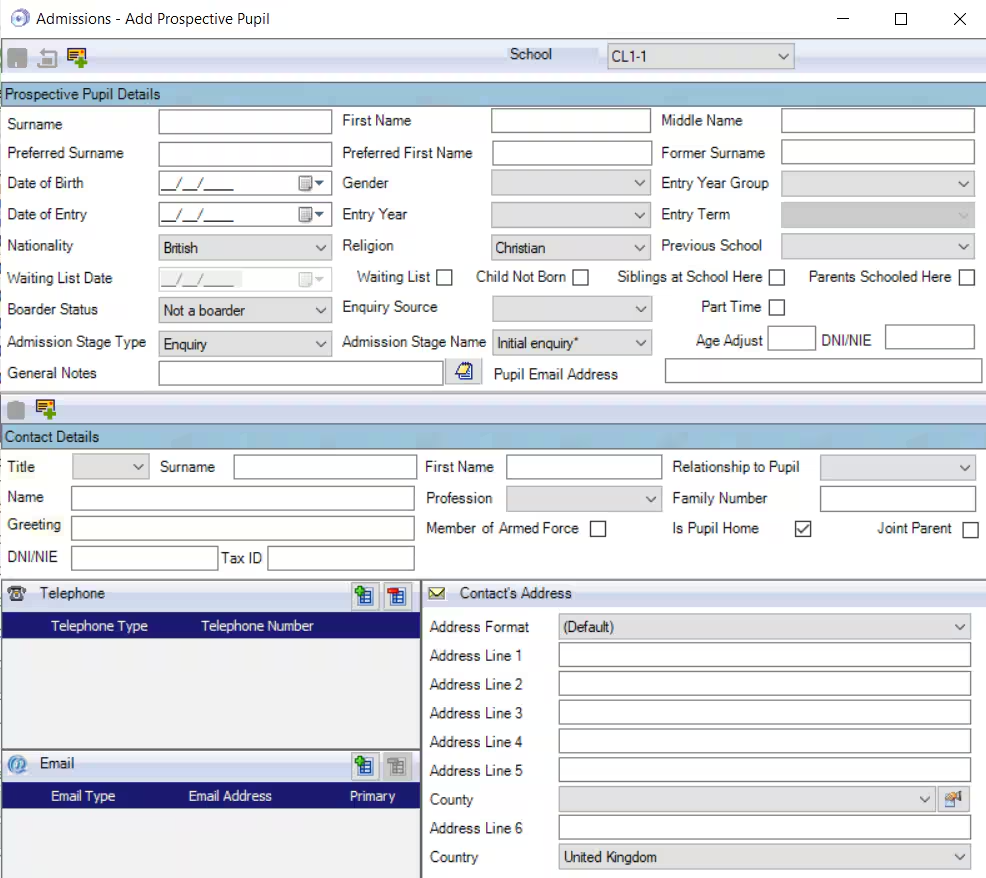
- Upon Save a blank form will appear, allowing you to add another pupil. Close the window if not required.
More information can be added to the pupil record.
Was this article helpful?
That’s Great!
Thank you for your feedback
Sorry! We couldn't be helpful
Thank you for your feedback
Feedback sent
We appreciate your effort and will try to fix the article