TABLE OF CONTENTS
Introduction
A pupil can be deleted or purged from the prospective, new intake, past or old scholar stages. A pupil can't be deleted if they match the following criteria:
- The Child Protection Register Indicator on the Care Authority tab is ticked.
- The pupil has a deposit balance in the Fees > Collections > Receive or Refund Deposits screen.
- The pupil has fees data less than X years old associated with them. The number of years that financial data must be retained is set in Fees > Set Up > Fees Policies. The default is 7 years but this can be altered.
- The pupil has been cloned.
Delete a pupil
Go to the relevant pupil stage and search for the pupil in the name search field.

Select the Delete button.

- The Purge Pupil window opens.
- Select the pupil and click Purge.
An information message appears.
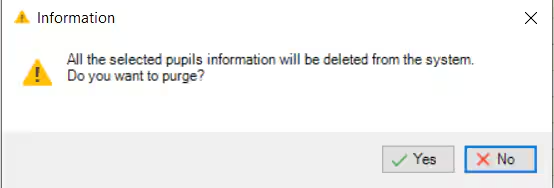
- Select Yes.
- If the pupil meets all the deletion criteria another message appears asking if you wish to delete associated DMS data and Fees Invoices and Receipts. Tick as required and click OK. The pupil and all their data has now been deleted.
- If a pupil does not meet the deletion criteria the screen displays the reasons they can’t be deleted. Press Print to get a report.
Anonymise a pupil
If you are unable to delete a pupil record due to one of the reasons above you can anonymise their data, including their firstname, surname, gender and date of birth.
- Follow steps 1-6 listed above.
The Delete Pupil Errors window opens, displaying the reasons the pupil can't be deleted.
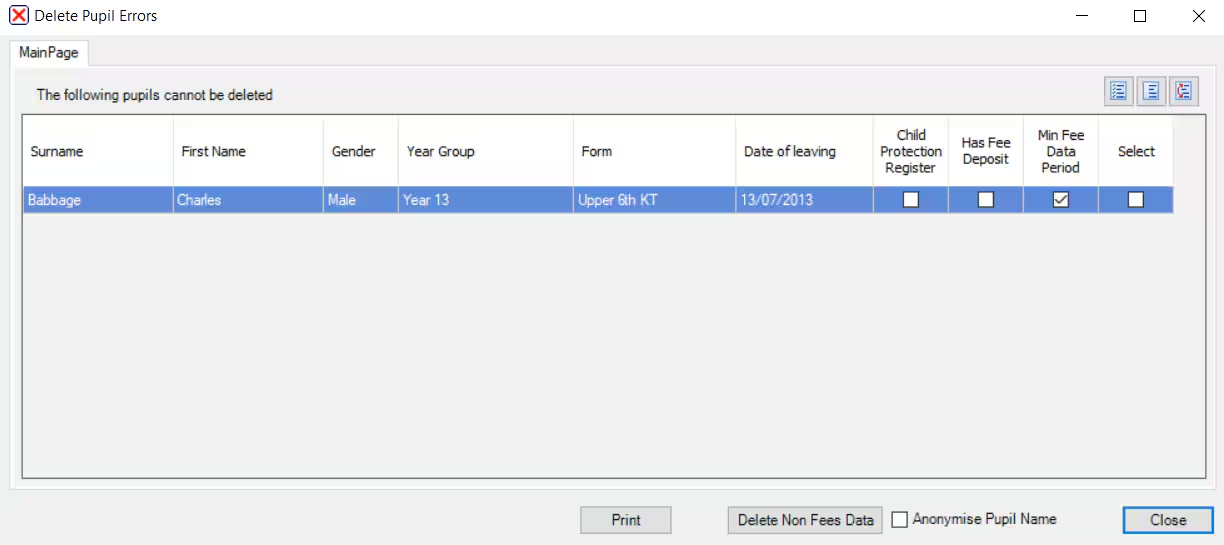
- Select Anonymise Pupil Name and select Close.
For more information see Deleting Pupil and Contact data for GDPR Purposes.
Was this article helpful?
That’s Great!
Thank you for your feedback
Sorry! We couldn't be helpful
Thank you for your feedback
Feedback sent
We appreciate your effort and will try to fix the article