TABLE OF CONTENTS
Introduction
Session attendance refers to attendance taken in the morning and/or afternoon. Class attendance refers to attendance taken during every period/lesson of the day. You can link session attendance to class attendance so the register from a chosen period also populates the morning/afternoon session.
Link Session and Class Attendance
- Go to Modules > Attendance > Define Attendance Parameters.
- Go to Working Data.
- Select the Year group you want to edit from the list on the left.
- Select the first day of the week and go to the Sessions section.
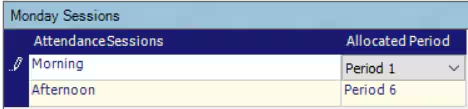
- Select the period from the drop-down list to allocate it to the attendance session.
- Select Save.
- Repeat for all days of the week.
- Select the next year group and repeat the steps.
Was this article helpful?
That’s Great!
Thank you for your feedback
Sorry! We couldn't be helpful
Thank you for your feedback
Feedback sent
We appreciate your effort and will try to fix the article