TABLE OF CONTENTS
Introduction
To include activities in the daily attendance, add the relevant number of periods to the Attendance Parameters against the Activities Year Group. A register can only be taken for an activity which is linked to Class attendance, and not Session attendance.
Attendance for activities
- In the Staff Portal ensure that Class Attendance is ticked in Admin > Setup > Setup.
- Select the Register tab and select Class Attendance.
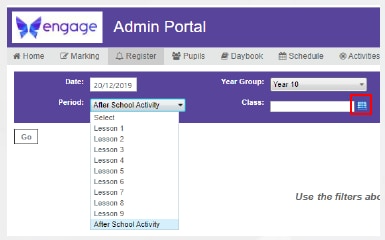
- Select the Date the activity takes place; the Activities year group and the Period chosen in the Register Link.
Select the timetable icon next to the Class field.
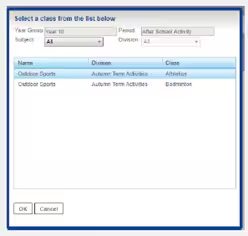
Choose the activity from the list and select OK, then select Go to display the register.
- All pupils enrolled in the activity are listed and attendance can be recorded.
Note: Instructions to amend Attendance Parameters and to Link Registration Periods to activities are available on page 18 and 19 of the Attendance Workbook.
Was this article helpful?
That’s Great!
Thank you for your feedback
Sorry! We couldn't be helpful
Thank you for your feedback
Feedback sent
We appreciate your effort and will try to fix the article