TABLE OF CONTENTS
Introduction
You can delete a supplier from the Supplier Management screen only if you have never posted a transaction against them.
Delete and unused supplier
If you have never used a supplier, you can delete them. If you have used them, you can only mark the supplier as Inactive.
To delete a supplier
- Go to Purchases>Supplier Management and load the supplier to delete from the Select Company browse screen.
- Validate that you have chosen the correct supplier.
- Go to File>Delete Record.
Select Yes to the following confirmation message:
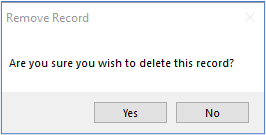
- A confirmation message appears to say the record is removed.
If you receive the following message instead, your only option is to mark the supplier as inactive. Inactive suppliers do not appear when you enter invoices, purchase orders or requisitions.
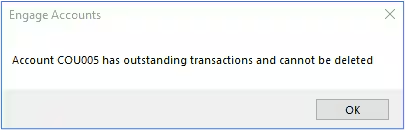
- Select the Mark as Inactive tick box in the general tab, then Close and Save the Supplier Management screen.
For more information on working with Suppliers, please refer to the Engage Accounts Purchases guide.
Was this article helpful?
That’s Great!
Thank you for your feedback
Sorry! We couldn't be helpful
Thank you for your feedback
Feedback sent
We appreciate your effort and will try to fix the article