TABLE OF CONTENTS
Introduction
As part of the Administration Rollover process, the School Admin team can set a Future Year and Form group to all pupils in the school. If this has been set prior to you issuing your invoices for the first term in the new school year, invoices can print showing this Future Year Group / Form, instead of the current year settings.
Use the Year Group/Form option when you raise invoices
- Go to Fees>Invoices>Raise Invoices.
- Select the invoices you want to issue in the main grid and set dates for the invoice in the Raise Invoice Parameters pane, together with any Term Text or other invoice text.
- From the Year Group/Form option, select either Current (default) or Future to define the invoice text to print next to each pupil name.
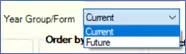
- Complete the Raise Invoice Parameters pane and then select the Raise Invoices button and follow the normal process.
- The invoices will appear with either the Current or Future year group per your selection next to each pupil name.
Note: Please note that the Future option will only work where the Future Year and Form groups have been set against pupils in the main Pupils>”New Intake/Current/Leaver” screens.
For more information on issuing invoices, please refer to the Engage Fees Billing guide, Invoices section. For more information on working with settings for the Year End, please see the Fees End of Year Process guide.
Was this article helpful?
That’s Great!
Thank you for your feedback
Sorry! We couldn't be helpful
Thank you for your feedback
Feedback sent
We appreciate your effort and will try to fix the article