TABLE OF CONTENTS
Introduction
You can use the Multiplier function in a Direct Debit payment profile to raise an initial termly invoice and use it as a basis to calculate an annual DD collection amount, but if the Extras element of invoices varies each term you need to follow a different method.
If your termly invoices are identical, please see Use the Direct Debit multiplier function to invoice termly but collect DDs across the year.
If you are only using Fee type charges for your Extras, please refer to Use the Direct Debit multiplier function with varying termly invoices.
Use the Direct Debit multiplier function with varying extras
- Go to Fees>Setup>Payment Profiles.
- Create a new Direct Debit type payment profile.
Set the Termly to 3 (or 4) for the multiplier and the correct number of collections.
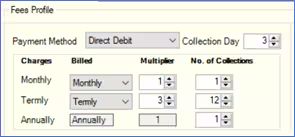
- Set the DD Remittance text to show the first collection and subsequent remaining collection amounts for all collections.
- Deselect Extras in the Include section. This opens a second collection method for the Extras element of the invoice.
- If you select the Other Payment Method , you will not collect the Extras by Direct Debit. You should make alternative arrangements for parents to pay this element.
- If you select the Direct Debit Payment Method, you can set the number of instalments and collection date for the Extras element of the invoice. You may wish to set a different collection date for the Extras than for Fees. Do not set the multiplier against the Extras Profile.
- Raise the initial invoice normally for the payment profile, setting the first collection month in the Fees>Invoices>Raise Invoices screen for Fees and Extras. This will populate the Fees>Collections>Edit DD Schedule screen with all the DD collection instalments for the year for Fees and the collections for Extras for the current term only, ready for submission.
- For subsequent terms, when you issue the invoice, only set the collection month for the Extras element in the Raise Invoices This will only generate the DD instalments for the Extras element of the invoices. The original Fees collection instalments will not change. We recommend that you select Extras from the Include section before you produce the invoice.
Note: For more information on working with Direct Debits please see the Engage Direct Debits guide.
Was this article helpful?
That’s Great!
Thank you for your feedback
Sorry! We couldn't be helpful
Thank you for your feedback
Feedback sent
We appreciate your effort and will try to fix the article