TABLE OF CONTENTS
Introduction
If you need to post an invoice or credit note onto your system but not issue the document by email, you can do this during the posting process.
Print an invoice for Email Delivery type without emailing it
- Go to Fees>Invoices>Raise Invoices and select the invoice to post.
- Follow the normal posting process and select Yes at the Post Invoices prompt.
- When the Send Invoices screen appears, instead of selecting Send Emails or Send Portal Emails, select the Close button to bypass the emailing process.
Select Yes to the following confirmation message.
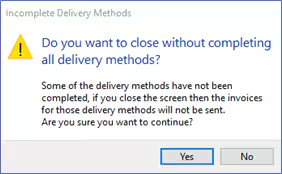
- The posting process continues in the normal way and no emails are sent.
For more information on posting invoices, see the Engage Fees Billing guide Raise Invoices section.
Was this article helpful?
That’s Great!
Thank you for your feedback
Sorry! We couldn't be helpful
Thank you for your feedback
Feedback sent
We appreciate your effort and will try to fix the article