TABLE OF CONTENTS
Introduction
Although the Allocate Pupil charges screen shows all charges and discounts allocated, it does not necessarily show the actual values that will appear on the final invoice.
Understand the value of allocated charges
Standard Fee, Extras or Deposit type charges show the Allocated Value and will appear on an invoice.
Percentage discount, premium or SFPS type charges, only calculate after you compile the charges in Fees>Compilation>Compile Contributions. There must be a relevant charge within the same charge group for them to calculate against.
Fixed discount or surcharge amounts show the full allocation value before compilation but will only show on an invoice if there is a relevant charge for them to go against.
In the following example the pupil has an allocated Lunch charge, a bursary of 50%, a fixed discount of £100 for music scholarship and a 10% foreign student premium charge.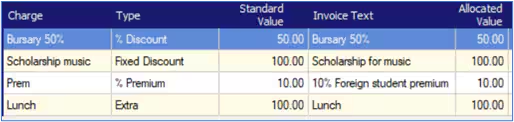
The final invoice extract. however, only shows the lunch charge of £100, since there are no relevant Fees for the discounts and premium to show against.
Note: For more information on working with charges and discounts, please see the Engage Fees Setup guide. For more information on Allocating Charges and Compiling Charges, please see the Engage Fees Billing guide.
Was this article helpful?
That’s Great!
Thank you for your feedback
Sorry! We couldn't be helpful
Thank you for your feedback
Feedback sent
We appreciate your effort and will try to fix the article