TABLE OF CONTENTS
Introduction
As part of the invoice posting process, a confirmation message appears on the screen which confirm if you want to post invoices.
Confirm Invoices are ready to post
When you select YES to the confirmation message in either the Raise Invoices, Post Manual Invoices, or Post Manual Credit Notes screens, you are committing the posting.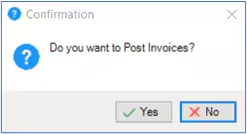
Engage Fees updates the Fee Payer account, generates the posting for the nominal ledger, and launches the invoice/credit note production routine.
If you have committed the posting the only way to correct it is to reverse the invoice. This generates a credit note (or invoice if you reverse a credit note), that automatically matches to the original transaction.
Note: For more information on posting invoices, please see the Engage Fees Billing guide, Invoices section
Was this article helpful?
That’s Great!
Thank you for your feedback
Sorry! We couldn't be helpful
Thank you for your feedback
Feedback sent
We appreciate your effort and will try to fix the article