Introduction
When you launch Engage Accounts, your live databases and any available Test companies will show. Although there is a delete option on the launch screen it does not actually delete the database, which will remain on your system. You should use the Remove Dummy Copy function to safely remove Test companies from the launch screen.
Auto Reverse a Journal
- Go to Tools>Our Companies>Remove Dummy Copy and highlight the Test company to delete.
- Use the Select button to delete the database.
Select Yes at the following confirmation message.
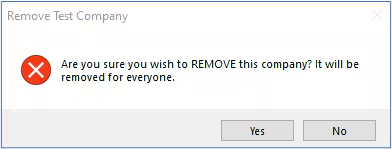
You may also be warned if your login was not used to create it before confirming.
- The Test company database will be deleted and will no longer be available to use on the launch screen.
For more information on working with dummy databases, please see the Engage Accounts Tools and Utilities guide Tools section.
Was this article helpful?
That’s Great!
Thank you for your feedback
Sorry! We couldn't be helpful
Thank you for your feedback
Feedback sent
We appreciate your effort and will try to fix the article