TABLE OF CONTENTS
Introduction
You can opt to automatically update registration charges invoiced in the Pupil Registration Details. Engage automatically tracks the charges you nominate as Is Registration.
Use Is Registration Fee in the Charge and Discount Structure
Automatically track Registration Fees
- Go to Fees > Setup > Fees Policies – Registration Details.
- Select Automatically update Registration Fee fields in Pupil Registration Details.
- Save your settings.
The following fields are no longer active in the Pupil screen and only update from Fee transactions:
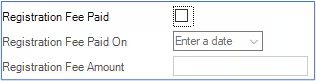
To set a charge as Is Registration Fee
- Go to Fees > Setup > Charge and Discount Structure.
- Select the charge in the main grid, (or create a new charge item) which Engage Fees will treat as a Registration Fee.
- Select the Is Registration Fee tick box on the right-hand side of Charge Item pane at the bottom of the screen.
- Save your settings.
- When enter a payment against the invoice containing Registration Details, Engage updates the respective Pupil Registration Details.
Note: For more information on working with the Fees Policies screen and the Charge and Discount structure, please see the Engage Fees Setup guide.
Was this article helpful?
That’s Great!
Thank you for your feedback
Sorry! We couldn't be helpful
Thank you for your feedback
Feedback sent
We appreciate your effort and will try to fix the article