TABLE OF CONTENTS
Introduction
Admission stages are entered by you to reflect the admission process at your school from start to finish. Admission stages allow you to filter the prospective pupils to see how many are in each stage of the process. Admission stages are stored in the Pupil Admission History so they can be referred back to.
Before entering the admission stages we recommend you write down the full admission process to ensure all stages are captured. You can add stages but you can't delete them once they've been used as they are attached to data. Our Engage Admissions Questionnaire will help you.
Examples of admission stages
Admission stages are added as a main category - Stage Type and a sub-category - Stage Name. This allows you to have multiple options within a category.
| Stage Type | Stage Name |
| Enquiry | Website Enquiry |
| Telephone Enquiry | |
| Email Enquiry | |
| Offer | Offer Made |
| Offer Accepted | |
| Offer Declined | |
| Offer Withdrawn | |
| Fees | Registration Fee Paid |
| Deposit Paid |
To add Admission Stages:
- In Engage go to Setup > Configuration > Admissions Stages.
- Select Add New.
- In the Admission Stage section at the bottom of the screen select the Stage Type from the drop-down list, or create a new one if required. Find out how below.
- Enter the Stage Name.
If the stage is an appointment, tick the Is Appointment field. This adds date, time and list of staff fields to the admissions stage so the information can be recorded.
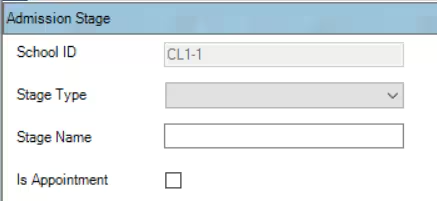
- Select Save.
- Repeat for all admission stages.
To add new Stage Types:
- In Engage go to Setup > Configuration > Admissions Stages.
- Select Add New.
- In the Admission Stage section at the bottom of the screen select the Stage Type drop-down list and select <New/Edit>.
- The Add/Edit window opens.
- Select Add New.
Enter a Code (up to 4 characters) and a Description.
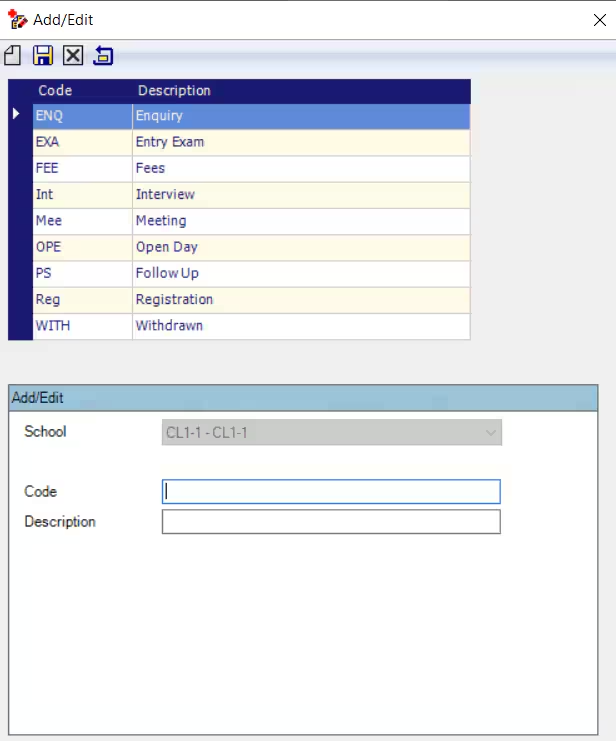
- Select Save and close the window.
- The new option is available to select from the drop-down list.
Was this article helpful?
That’s Great!
Thank you for your feedback
Sorry! We couldn't be helpful
Thank you for your feedback
Feedback sent
We appreciate your effort and will try to fix the article