TABLE OF CONTENTS
Introduction
Update Admission Stages allows you to update multiple pupils at once. For example, if you have offered 10 places to pupils you can update their stages in one go. The Current Stage Type, Current Stage Name and Current Admission Status can all be updated.
Update Admission Stages
- In Engage, go to Pupils > Prospective.
Select the Update Admissions Stages icon.

- The Update Admission Stages screen opens.
Use the filters at the top of the screen to find the relevant pupils, or select them in the list.
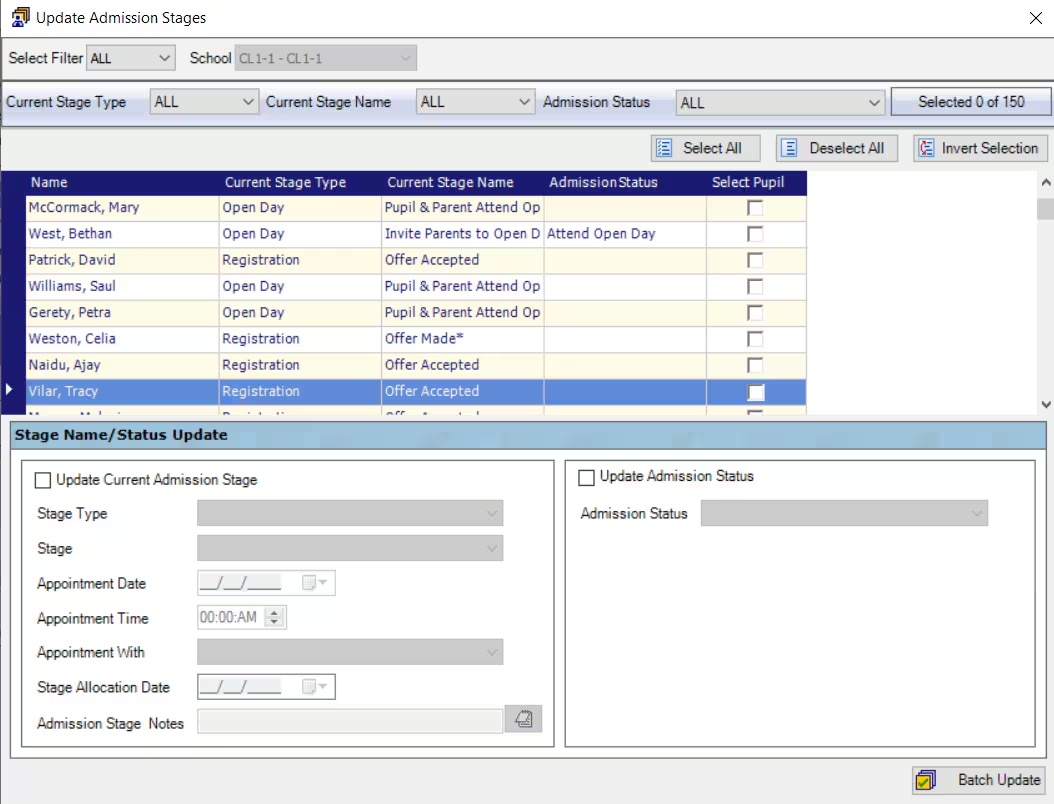
- In the bottom half of the screen, tick Update Current Admissions Stage and/or Update Admission Status. Complete the relevant fields.
- Select Batch Update.
- The records of the chosen pupils will be updated.
Was this article helpful?
That’s Great!
Thank you for your feedback
Sorry! We couldn't be helpful
Thank you for your feedback
Feedback sent
We appreciate your effort and will try to fix the article