TABLE OF CONTENTS
Introduction
After you allocate charges to Pupils in Engage Fees you need to identify the bill payer(s) who will receive the charges on an invoice. You can see the total of these charges allocated from the Manage Contact Contributions screen.
Show all Contributions for a Bill Payer
- Go to Fees>Allocation>Manage Contact Contributions.
- Select a Pupil in the main grid linked to the Bill Payer you want to view.
- In the Contact Contributions pane select the Bill Payer contact.
- Select the Show All Contributions of Selected Contact button.
- The All Contributions of Select Contact window will open with the contact selected in the top pane. All details of contributions against allocated pupil charges will show in the lower pane.
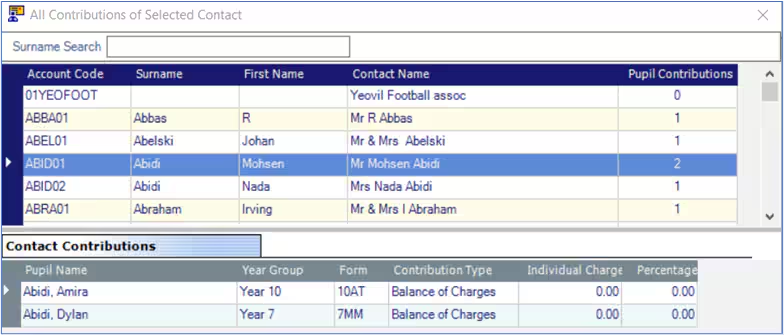
- You can select a different Bill Payer contact from the top pane and can use the Surname Search to help you refine the view.
Note: For more information on working with Contact Contributions, please see the Engage Fees Billing guide, Allocation section.
Was this article helpful?
That’s Great!
Thank you for your feedback
Sorry! We couldn't be helpful
Thank you for your feedback
Feedback sent
We appreciate your effort and will try to fix the article